JA4 Signatures: The fingerprint that bots find difficult to fake
Last week, I encountered a security incident that resulted in a Denial of Service (DoS) for an e-commerce API. Every request carried a Chrome User-Agent header. Valid cookies. Residential IP addresses. Rate limiting didn’t trigger because the requests trickled in at human-like intervals across thousands of IPs.
The question isn’t whether these attacks will reach your infrastructure. It’s whether you can fingerprint each connection and identify what it actually is, regardless of what it claims to be.
For centuries, people in the Indian state of Kerala have used three composite identifiers to uniquely identify people which still exists today.
- Their ancestral house name (veedu peru)
- Their given name (First name and Surname).
- Their village (desam)
The naming system works in layers.
-
The ancestral house name - ( veedu peru or tharavadu peru) carries more weight than a family name in the Western sense. It identifies your specific lineage and property. Two families with the surname “kutty” in the same village might be completely unrelated, but their house names distinguish them immediately.
-
Then comes the given name.
-
Then the village or the locality the family belongs to (desam or sthalam).
For example “Ramesh” could be anyone.
The fingerprint quality comes from the combination. “Ramesh” alone is common. “Ramesh from Kottayam” narrows it. “Padinjarekara Ramesh from Kottayam” is essentially unique — you’ve identified not just the person but their lineage, their ancestral property, and their geographic origin in one string.
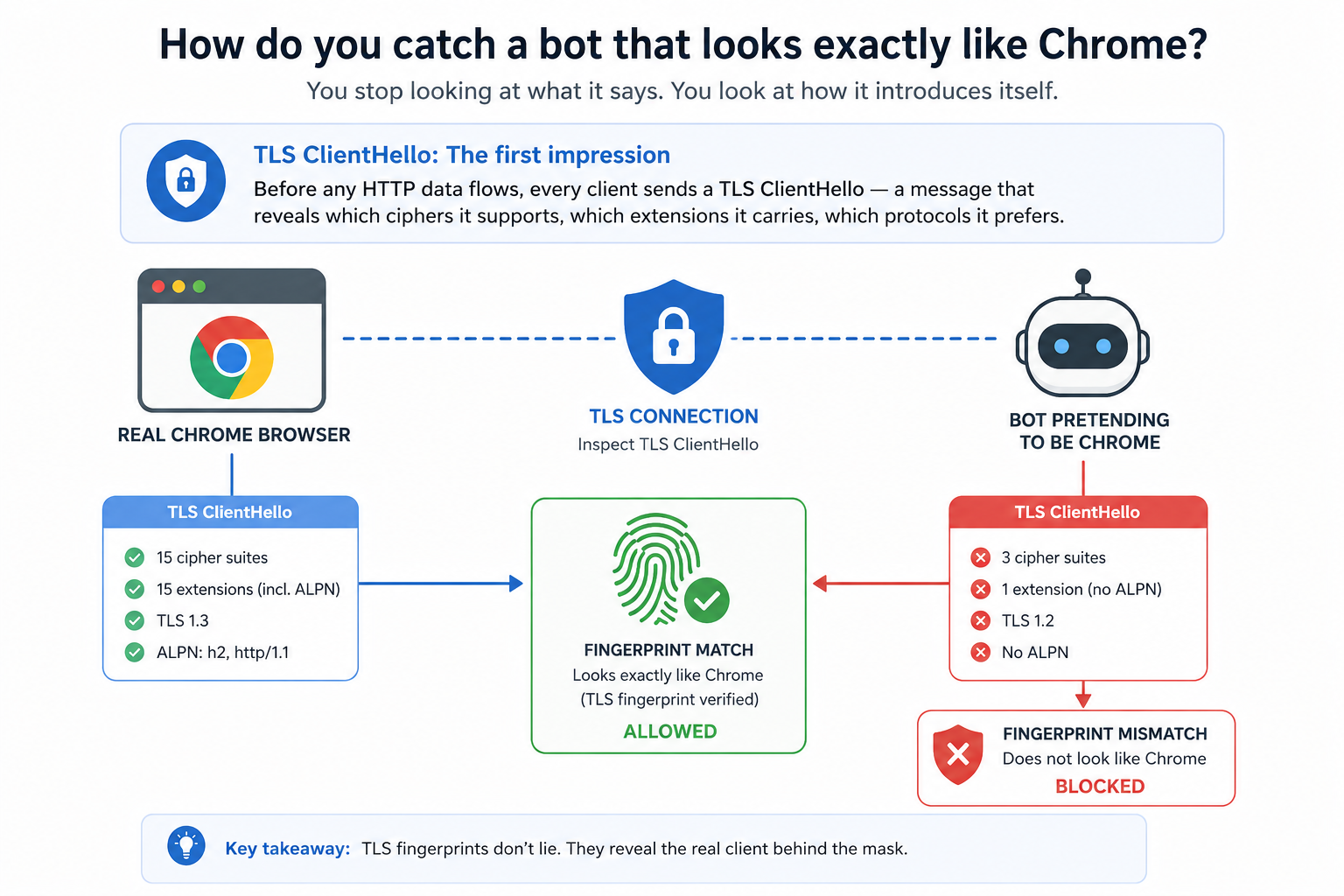
There’s a layer of network identity that works the same way as the Kerala naming system to uniquely identify each connection. It’s called JA4 fingerprinting, and it lives in the TLS handshake which is a three-part signature that reveals what a client actually is, regardless of what it claims to be.
What Happens Before Your App Even Sees a Request
When a client connects to your server over HTTPS, a handshake happens before any application data flows. Think of it like arriving at a building with a security desk. Before you get to your meeting, you show your ID, exchange credentials, agree on how you’ll communicate.
The TCP handshake establishes the connection (SYN, SYN-ACK, ACK). Then the TLS handshake negotiates encryption. The very first message the client sends in TLS is called the ClientHello. It contains:
- Which TLS versions the client supports
- Which cipher suites it offers (the encryption algorithms it knows)
- Which extensions it wants to use
- What protocols it prefers (HTTP/2, HTTP/1.1, HTTP/3)
A real browser, a Python script, a Go binary, and a piece of malware all construct this message differently. They use different libraries, different defaults, different capabilities. The ClientHello is an involuntary fingerprint that the client can’t help but reveal what it actually is.
JA3 was the first widely-adopted method for fingerprinting ClientHellos. It worked, but it produced opaque MD5 hashes that told you nothing at a glance, broke when GREASE values randomized fields, and couldn’t distinguish between similar clients. JA4 fixes all of that.
What is JA4?
JA4 isn’t a single fingerprint. It’s a family — the JA4+ suite — and each member fingerprints a different layer of the connection.
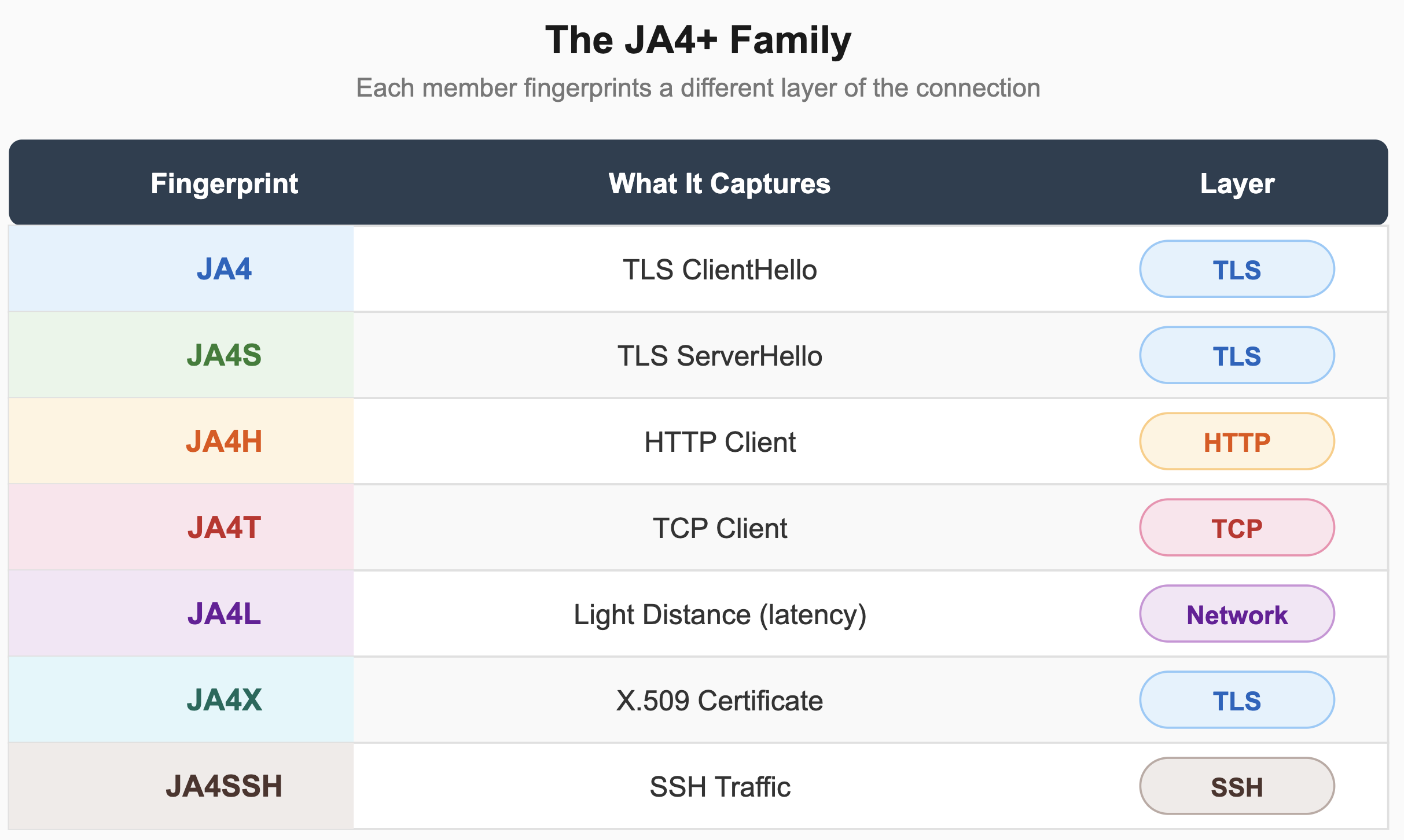
Three innovations make JA4 fundamentally better than its predecessors.
It’s human-readable. A JA4 fingerprint looks like t13d1515h2_8daaf6152771_e5627efa2ab1. That first section — t13d1515h2 — tells you immediately: TCP connection, TLS 1.3, domain name present, 15 cipher suites, 15 extensions, HTTP/2. You can glance at it and know you’re looking at a modern browser. Compare that to JA3’s 66918128f1b9b03303d77c6f2eefd128. Which one tells you something useful at 3 AM during an incident?
GREASE removal and sorting produce stable fingerprints. GREASE (Generate Random Extensions And Sustain Extensibility) values are dummy entries browsers inject to prevent server ossification. They change randomly between connections. JA4 strips them and sorts the remaining values, so the same client produces the same fingerprint every time — regardless of GREASE randomization.
Layered fingerprinting catches sophisticated evasion. A bot might match a browser’s TLS fingerprint by using a patched TLS library. But does its TCP window size match? Does its HTTP header order match? JA4T + JA4 + JA4H together create a multi-dimensional identity that’s expensive to fully replicate.
How JA4 Works — Under the Hood
A JA4 fingerprint has three sections separated by underscores:
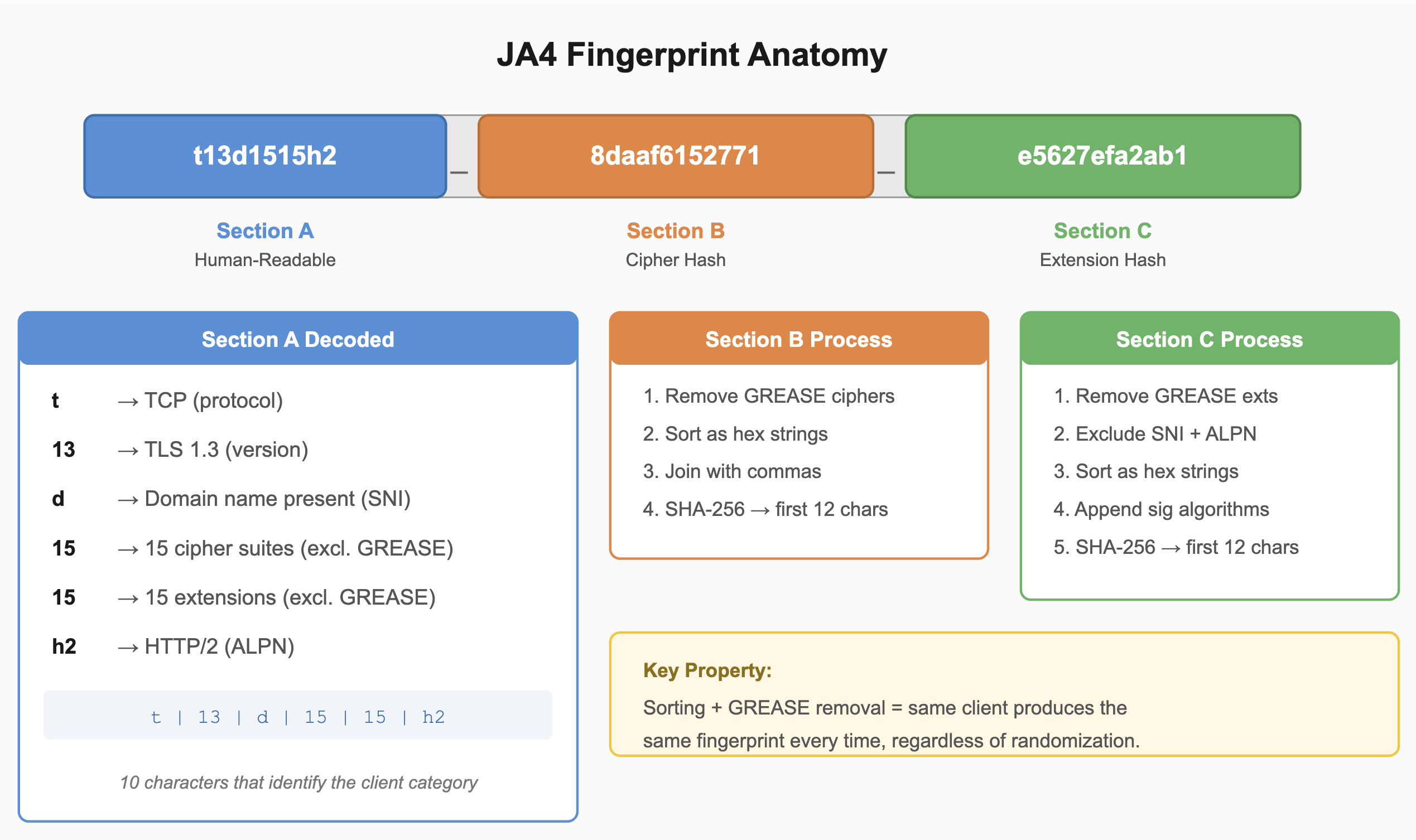
Each section adds a layer of specificity.
Section A is the human-readable metadata. It encodes protocol type, TLS version, whether SNI is present, cipher count, extension count, and ALPN value. Ten characters that tell you immediately what category of client you’re looking at.
Section B is the first 12 characters of a SHA-256 hash computed over the sorted, GREASE-removed cipher suites. Two clients might share the same Section A (same TLS version, same extension count) but their cipher suite selections reveal different TLS libraries and configurations.
Section C hashes the extensions (excluding SNI and ALPN, already captured in Section A) plus signature algorithms. Two clients using the same library version might still differ here based on how they’ve been configured.
Any single section has collisions. Together, they produce a composite identifier with enough entropy to differentiate millions of distinct clients.
The sorting step is what gives JA4 its stability. Two connections from the same client will produce identical fingerprints even if the underlying library randomizes the order of ciphers or extensions. The hash truncation keeps things compact while preserving enough uniqueness to differentiate millions of distinct clients.
Here’s what the comparison looks like across three very different clients:
Chrome Browser:   t13d1515h2_8daaf6152771_e5627efa2ab1

Python requests: t12d0907h1_ac4b62f6e85_7cdb5ce3f4e2

Malware (minimal): t12d030100_b8c8b6e2a142_3f2e7a9d1bc4
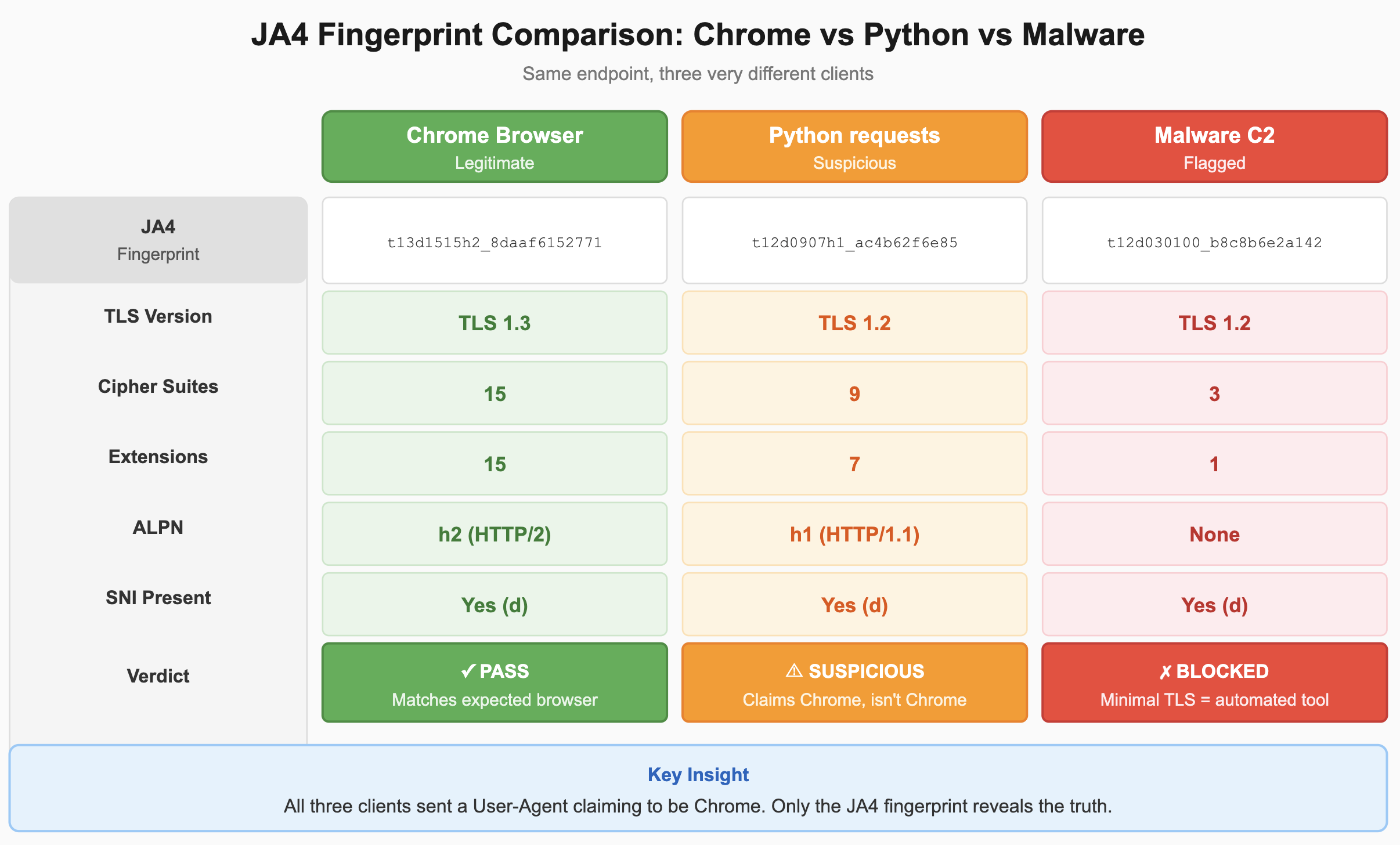
Even without decoding the hashes, Section A alone creates a self indictment for the malware signature. It is a request claiming to be a Chrome browser but showing t12d0301 — TLS 1.2, three cipher suites, no Application Layer Protocol Negotiation (ALPN) is lying. No modern browser looks like that particularly Chrome.
Code Demo: Building a JA4 Fingerprint
The following Python script (included in this repo as ja4_fingerprint_demo.py) demonstrates the complete JA4 construction algorithm. It doesn’t require packet capture — it uses simulated ClientHello messages to show the math clearly.
The key functions:
def remove_grease(values: list) -> list:
    """Remove all GREASE values from a list of cipher/extension IDs."""
    return [v for v in values if not is_grease(v)]


def build_section_a(hello: ClientHello) -> str:
    """
    Build the human-readable section.
    Format: {protocol}{version}{sni}{cipher_count}{ext_count}{alpn}
    Example: t13d1516h2
    """
    proto = hello.protocol
    version = TLS_VERSION_MAP.get(hello.tls_version, "00")
    sni_flag = "d" if hello.sni else "i"
    ciphers_no_grease = remove_grease(hello.cipher_suites)
    cipher_count = f"{len(ciphers_no_grease):02d}"
    extensions_no_grease = remove_grease(hello.extensions)
    ext_count = f"{len(extensions_no_grease):02d}"

    if hello.alpn:
        first_alpn = hello.alpn[0]
        alpn_mapped = ALPN_MAP.get(first_alpn, f"{first_alpn[0]}{first_alpn[-1]}")
    else:
        alpn_mapped = "00"

    return f"{proto}{version}{sni_flag}{cipher_count}{ext_count}{alpn_mapped}"
Section B sorts cipher suites as hex strings and hashes them:
def build_section_b(hello: ClientHello) -> str:
    ciphers = remove_grease(hello.cipher_suites)
    cipher_hex = sorted([f"{c:04x}" for c in ciphers])
    cipher_string = ",".join(cipher_hex)
    return hashlib.sha256(cipher_string.encode()).hexdigest()[:12]
Section C does the same for extensions, but excludes SNI and ALPN (already captured in Section A) and appends signature algorithms:
def build_section_c(hello: ClientHello) -> str:
    extensions = [
        e for e in hello.extensions
        if not is_grease(e) and e not in {0x0000, 0x0010}
    ]
    ext_hex = sorted([f"{e:04x}" for e in extensions])
    ext_string = ",".join(ext_hex)
    sig_algs = [f"{s:04x}" for s in hello.signature_algorithms]
    sig_string = ",".join(sig_algs)
    combined = f"{ext_string}_{sig_string}"
    return hashlib.sha256(combined.encode()).hexdigest()[:12]
Run python ja4_fingerprint_demo.py to see the full output with three simulated clients — Chrome, Python requests, and a minimal malware implementation. The difference is immediately visible.
For production use, see FoxIO’s official JA4+ implementation which handles the full spec including edge cases around QUIC, raw packet parsing, and integration with common network tools.
Real-World Security Use Cases
Bot detection. This is one use case where JA4 is effective. A credential-stuffing bot sets its User-Agent to Mozilla/5.0 (Windows NT 10.0; Win64; x64) AppleWebKit/537.36... — identical to Chrome. But it’s written in Go using a standard net/http client. Its JA4 fingerprint reveals TLS 1.2, 9 cipher suites, no ALPN. Chrome hasn’t looked like that since 2019. Blocked.
Malware hunting. Command-and-control frameworks leave distinctive fingerprints. Cobalt Strike’s default HTTPS beacon, Metasploit’s Meterpreter, Sliver, BruteRatel — they all use specific TLS libraries with specific defaults. Security teams publish known-bad JA4 fingerprints the same way they publish known-bad IP addresses, except fingerprints are harder for attackers to rotate.
API protection. Your mobile app uses certificate pinning and a specific HTTP client. You know its JA4 fingerprint. When someone reverse-engineers your API and makes calls from a Python script using stolen tokens, the fingerprint mismatch gives them away — even if every other header is perfect.
WAF enhancement. JA4 rules complement traditional signatures. A request might pass every content-based rule but get flagged because no legitimate client produces that fingerprint for that endpoint. The ja4db.com database catalogs fingerprints for known applications, making rule authoring straightforward.
Limitations and Considerations
JA4 isn’t a silver bullet. Sophisticated attackers using headless Chrome or patched browsers produce legitimate-looking fingerprints because they are legitimate browsers — just automated ones. Fingerprinting catches the gap between what traffic claims to be and what it is, but when the traffic genuinely is what it claims to be (just automated), you need behavioral analysis on top.
There are privacy implications. The same properties that let you fingerprint bots let you fingerprint users. JA4 is less granular than canvas fingerprinting or font enumeration, but it still contributes to a trackable identity. Use it for security, not surveillance.
Encrypted Client Hello (ECH), currently in draft, will eventually encrypt the ClientHello contents. When ECH reaches widespread adoption, passive fingerprinting becomes harder. Active fingerprinting techniques and server-side analysis will matter more.
JA4 works best as one signal in an ensemble — combined with behavioral analysis, rate limiting, device fingerprinting, and challenge-response mechanisms.
Getting Started
JA4 is already integrated into tools you probably run:
- Zeek — native JA4 support via package
- Suricata — JA4 keywords in rules
- Wireshark — JA4 column available in recent versions
- Cloudflare, AWS WAF, Fastly — various levels of JA4 support in CDN/WAF products
For the fastest path to value: start with JA4, the TLS fingerprint, to identify what each client actually is at the handshake layer. Then combine JA4 with JA4H (HTTP fingerprint) for deeper coverage — TLS-layer identity plus HTTP-layer behavior together catches the widest range of automated traffic with minimal false positives.
FoxIO maintains the open-source reference implementation with libraries for multiple languages and integration guides for common platforms.
Try it on your own traffic. Capture a few minutes of TLS sessions, compute the JA4 fingerprints, and see how many distinct client types appear. You’ll likely find that 80% of your traffic produces fewer than 10 unique fingerprints — and anything outside that set deserves a closer look.
The naming analogy in this post is inspired by the traditional naming conventions of the people of Kerala, India. Their system that achieved unique identification through layered context long before centralized identity systems existed. Credit and gratitude to the Malayali community for a cultural practice that elegantly illustrates how composite identifiers work.