Part 2: Building an ARD Registry in AWS
A searchable agent directory that indexes multiple partner catalogs using CloudFormation, Lambda, and S3
 —
—
Introduction
In the previous post we covered why agents need a discovery layer and how ARD works conceptually. This post builds it.
We’re going to deploy a working ARD registry in AWS. By the end you’ll have a POST /search endpoint that indexes agent catalogs from multiple partners and returns ranked results based on a natural language query.
The system we’re building
Let’s build a travel planner. A user says “Plan me a 5-day trip to Tokyo in March, budget $3000.” The orchestrator needs to search flights, book hotels, convert currencies, process payments, and suggest local activities. No single agent handles all of that.
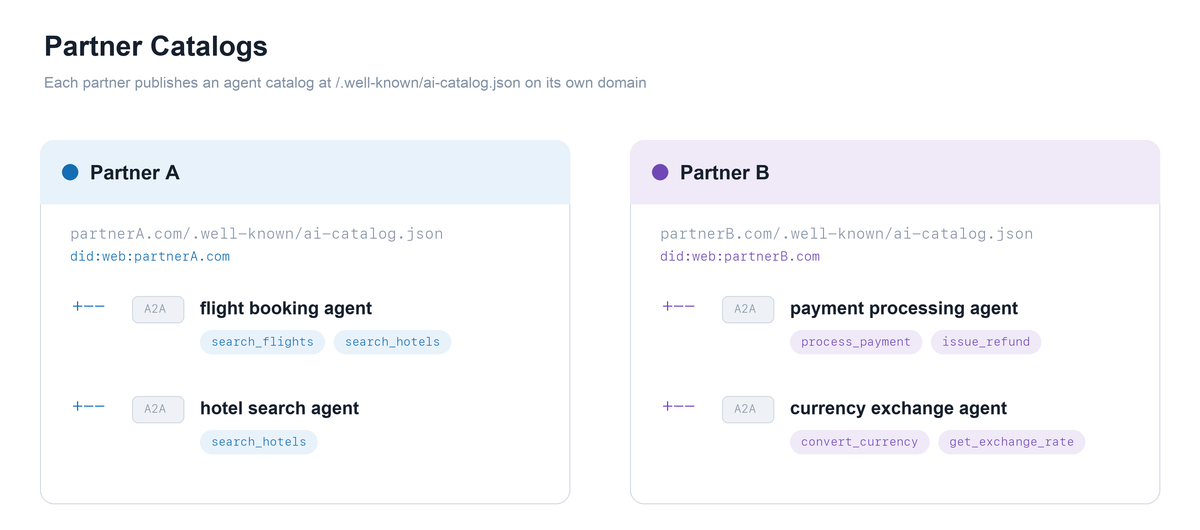
Some of those capabilities already exist as agents built and hosted by other companies. A travel tech partner runs a flight and hotel search agent. A fintech partner runs payment processing and currency exchange agents. We don’t own them, we don’t deploy them, we don’t even know their endpoint URLs upfront. But we need them at runtime.
We also have our own agent for recommending local activities. We built it and deployed it. we know exactly where it lives.
So the orchestrator needs four specialist agents:
- Flight & Hotel Specialist (from Partner A, a travel services company)
- Payment Processing Agent (from Partner B, a fintech company)
- Currency Exchange Agent (from Partner B)
- Local Trip Activities Agent (inhouse, ours)
The first three are partner agents. Published on their domains, maintained by them, outside our control. The partner agents need discovery. The last one is ours and doesn’t need a discovery service.
This post builds the discovery infrastructure: the registry that crawls Partner A’s and Partner B’s catalogs and makes their agents searchable. The inhouse agent never touches the registry.
Architecture
The registry only concerns itself with the partner agents. It crawls their catalogs, indexes all entries into a single searchable collection, and exposes a POST /search endpoint. When the orchestrator needs a capability it doesn’t own, it queries the registry, gets ranked results with source attribution, and picks the top match. The inhouse agent never enters this flow.
The backend has four AWS services. S3 stores the partner catalog files (simulating what would normally live on partnerA.com and partnerB.com in production). CloudFront serves those catalogs publicly over HTTPS with caching. A Lambda function loads all catalog files from S3 at cold start, merges their entries into one index, and handles search requests by scoring entries against the query using keyword overlap. API Gateway (HTTP API) sits in front of the Lambda, exposing the public POST /search route with CORS enabled.
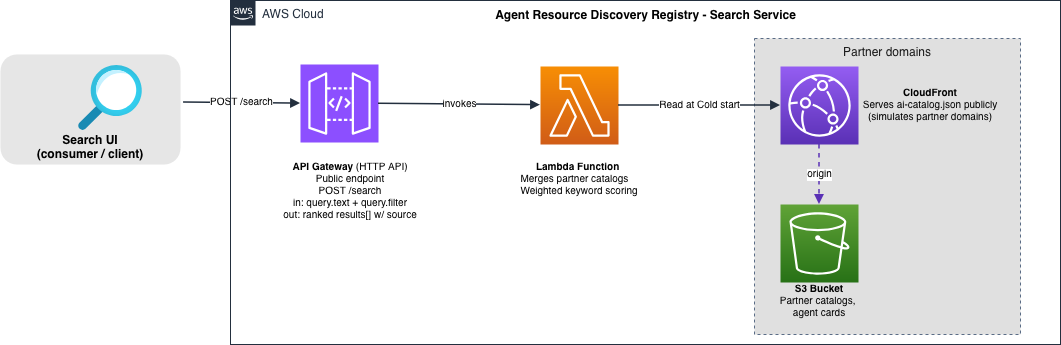
In real world, the registry would crawl partner domains remotely on a schedule. For this blogpost, we simulate both partners in S3 within the same AWS account. The protocol mechanics are identical either way.
The consumer (our orchestrator) calls POST /search, gets ranked results from the API endpoint, and picks the top match. It doesn’t need to know which partner published what, or how many partners exist behind the registry.
The partner catalogs
Each partner publishes a catalog at /.well-known/ai-catalog.json on their domain. These are separate files maintained independently.
Partner A’s catalog (partnerA.com/.well-known/ai-catalog.json):
{
  "specVersion": "1.0",
  "host": {
    "displayName": "Partner A - Travel Services",
    "identifier": "did:web:partnerA.com"
  },
  "entries": [
    {
      "identifier": "urn:air:partnerA.com:travel:flight-specialist",
      "displayName": "Flight & Hotel Specialist (A2A)",
      "type": "application/a2a-agent-card+json",
      "url": "https://partnerA.com/agents/flight-specialist-card.json",
      "description": "Searches flights and hotels, returns structured options with pricing and schedules.",
      "capabilities": ["search_flights", "search_hotels"],
      "tags": ["travel", "flights", "hotels", "booking"],
      "representativeQueries": [
        "find me a flight booking agent",
        "search flights from SFO to Tokyo and a hotel",
        "cheapest round-trip flight and a mid-range hotel"
      ],
      "trustManifest": {
        "identity": "https://partnerA.com",
        "identityType": "https",
        "attestations": []
      }
    }
  ]
}
Partner B’s catalog (partnerB.com/.well-known/ai-catalog.json):
{
  "specVersion": "1.0",
  "host": {
    "displayName": "Partner B - Financial Services",
    "identifier": "did:web:partnerB.com"
  },
  "entries": [
    {
      "identifier": "urn:air:partnerB.com:finance:payment-processor",
      "displayName": "Payment Processing Agent (A2A)",
      "type": "application/a2a-agent-card+json",
      "url": "https://partnerB.com/agents/payment-processor-card.json",
      "description": "Processes travel payments, handles multi-currency transactions and refunds.",
      "capabilities": ["process_payment", "issue_refund"],
      "tags": ["finance", "payments", "transactions"],
      "representativeQueries": [
        "process a payment for a flight booking",
        "handle a multi-currency transaction",
        "issue a refund for a cancelled hotel"
      ],
      "trustManifest": {
        "identity": "https://partnerB.com",
        "identityType": "https",
        "attestations": []
      }
    },
    {
      "identifier": "urn:air:partnerB.com:finance:currency-exchange",
      "displayName": "Currency Exchange Agent (A2A)",
      "type": "application/a2a-agent-card+json",
      "url": "https://partnerB.com/agents/currency-exchange-card.json",
      "description": "Converts between currencies with live rates, supports 150+ currencies.",
      "capabilities": ["convert_currency", "get_exchange_rate"],
      "tags": ["finance", "currency", "exchange", "forex"],
      "representativeQueries": [
        "convert USD to JPY",
        "what is the exchange rate for euros",
        "currency converter agent"
      ],
      "trustManifest": {
        "identity": "https://partnerB.com",
        "identityType": "https",
        "attestations": []
      }
    }
  ]
}
A few things to notice:
- Each catalog has its own
host.identifiertied to the partner’s domain. - Entries use URNs anchored to the publishing domain (
urn:air:partnerA.com:...vsurn:air:partnerB.com:...). - The
sourcefield in search results will tell the orchestrator which partner published each agent. - Partners maintain their catalogs independently. They don’t coordinate with each other or with us.
The search powered by Lambda function
The registry Lambda loads catalogs from S3 at cold start (simulating a crawl across partner domains), merges all entries into one index, and serves POST /search requests.
The scoring is keyword overlap weighted by field:
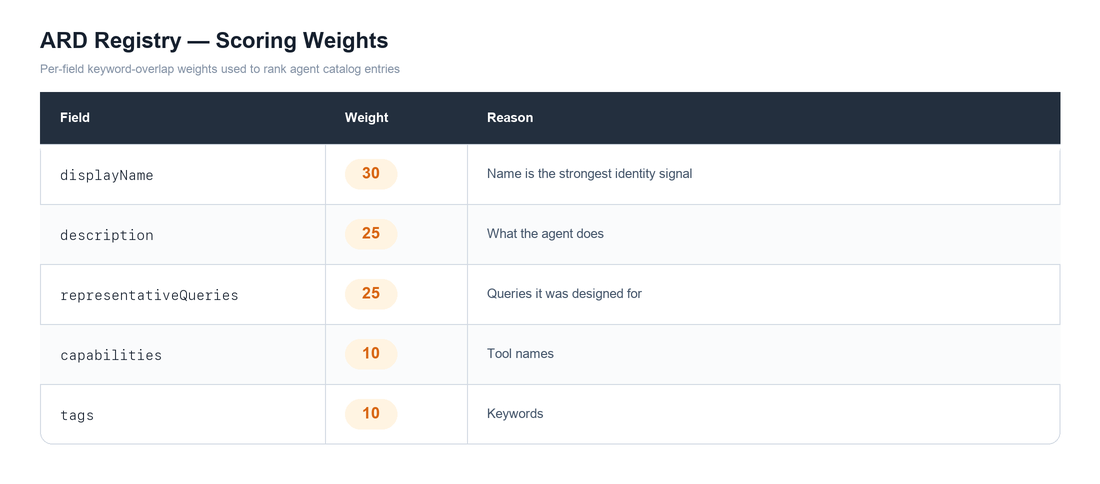
Formula used to calculate the score: (overlapping tokens / total query tokens) x weight per field, summed, capped at 100.
**Note: **As I started to work on the scoring the results, i found many weakness and a new respect for search algorithms. I will explain in detail how scoring works in my next post, its weakness today and how to improve it.
Deploy
The CloudFormation template and deploy script are in the GitHub repo. Clone the repo and run:
git clone https://github.com/rameshrajan-aws/ARD-Registry.git
cd ARD-Registry/part2-install
chmod +x deploy.sh
./deploy.sh
The script creates an S3 bucket, uploads the partner catalogs and Lambda code, then deploys the CloudFormation stack. It prints the registry URL when done.
Test
The repo includes a search UI (search-ui.html) for testing the registry visually. Serve it locally and open in a browser:
cd part2-install
python3 -m http.server 8080
Then open http://localhost:8080/search-ui.html. Enter a query, and the UI sends POST /search to your registry endpoint and displays ranked results with scores and source attribution.
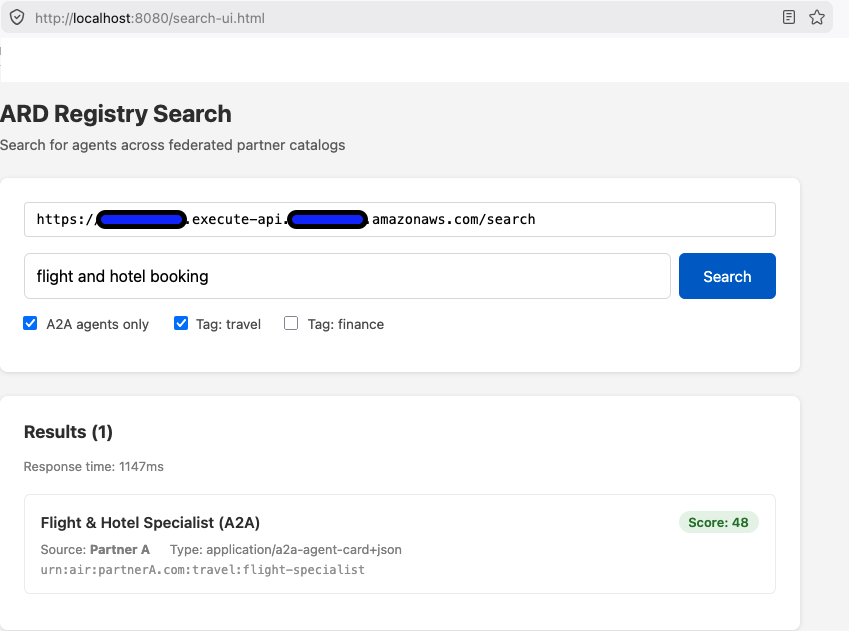
Alternatively, use curl:
Search for a flight agent (returns Partner A’s agent):
curl -s -X POST "https://<api-id>.execute-api.<region>.amazonaws.com/search" \
  -H "Content-Type: application/json" \
  -d '{"query":{"text":"flight and hotel booking","filter":{"type":["application/a2a-agent-card+json"]}},"pageSize":5}' | python3 -m json.tool
{
  "results": [
    {
      "identifier": "urn:air:partnerA.com:travel:flight-specialist",
      "displayName": "Flight & Hotel Specialist (A2A)",
      "score": 48,
      "source": "did:web:partnerA.com"
    }
  ]
}
Search for a payment agent (returns Partner B’s agent):
curl -s -X POST "https://<api-id>.execute-api.<region>.amazonaws.com/search" \
  -H "Content-Type: application/json" \
  -d '{"query":{"text":"process payment transaction","filter":{"type":["application/a2a-agent-card+json"]}},"pageSize":5}' | python3 -m json.tool
{
  "results": [
    {
      "identifier": "urn:air:partnerB.com:finance:payment-processor",
      "displayName": "Payment Processing Agent (A2A)",
      "score": 42,
      "source": "did:web:partnerB.com"
    }
  ]
}
Search for currency conversion (returns Partner B’s other agent):
curl -s -X POST "https://<api-id>.execute-api.<region>.amazonaws.com/search" \
  -H "Content-Type: application/json" \
  -d '{"query":{"text":"convert currency exchange rate"},"pageSize":5}' | python3 -m json.tool
{
  "results": [
    {
      "identifier": "urn:air:partnerB.com:finance:currency-exchange",
      "displayName": "Currency Exchange Agent (A2A)",
      "score": 52,
      "source": "did:web:partnerB.com"
    }
  ]
}
Search for something unrelated (zero scores):
curl -s -X POST "https://<api-id>.execute-api.<region>.amazonaws.com/search" \
  -H "Content-Type: application/json" \
  -d '{"query":{"text":"help me write a python script"},"pageSize":5}' | python3 -m json.tool
All scores come back at 0. No relevant agent found.
The orchestrator uses the source field to know which partner published each result. Different queries surface different partners. The registry handles the routing transparently.
In the next post, I am taking a diversion on explaining how the scoring and ranking works, where it breaks, and how to do it differently. Though it is not directly related to ARD, I will share my learning and insights.